
Try it in Mement
- Open Analytics and choose the relevant report and available period.
- Compare actual Task outcomes, Habit history and active Session time.
- Open Digital Twin attribute explanations before interpreting a score or mammoth stage.
Choose the right measure
Time from Task creation to completion is elapsed time, not hours worked. Sessions measure active time excluding pauses. Habit logs remain separate from Task completion. Advanced Analytics periods and reports may require Pro.
Understand the mammoth’s rules
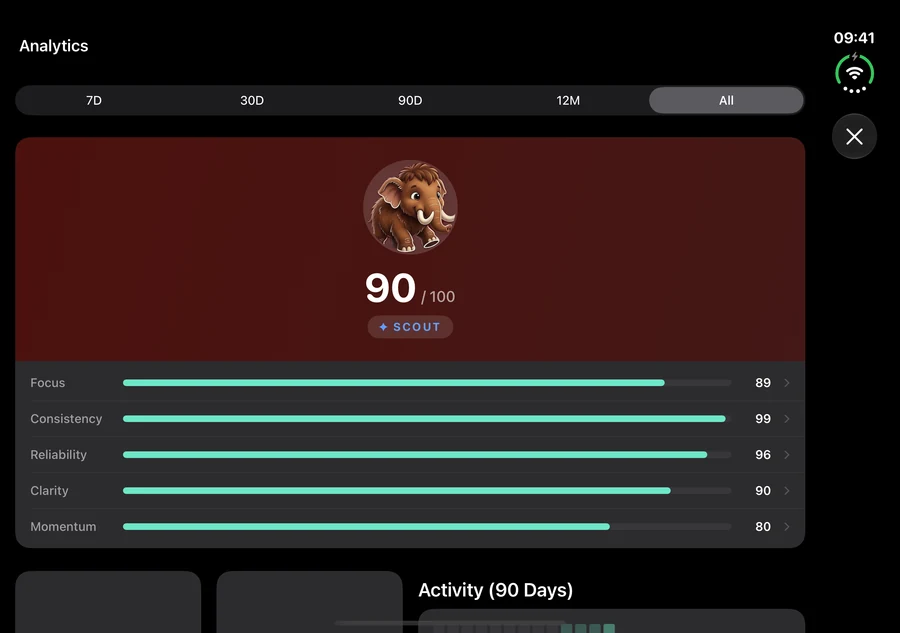
Digital Twin uses app-defined Focus, Consistency, Reliability, Clarity and Momentum attributes. Focus uses foreground Active-Space intervals, not Session minutes. Stages and achievements have separate conditions; a stage can fall after sustained recorded low scores. Optional Health adjustments stay local. None of these values measures ADHD severity, attention capacity or your worth.
How it works in Mement
Use Analytics to review your plans and keep a report
Read the numbers as questions about your work
Created and completed activity can show whether new work is arriving faster than you finish it. Active and overdue totals help you decide what to review next. Priority, age, tags, recurring work, Projects and Areas give different views of that workload. The available cards and advanced breakdowns depend on your access.
For an illustrative Project containing ten Tasks with four completed, its completion rate is 40%. This describes the Tasks included in that view. It does not mean you have spent 40% of the effort the Project needs, because Tasks can take very different amounts of work.
The average completion-time card needs at least five completed Tasks with usable saved dates. It currently compares those dates with when the Tasks were created. A saved date can be the scheduled day, so this card does not reliably tell you how much time passed before you actually finished the work. For time spent working, use active Session minutes, which exclude pauses.
The selected range first limits Task statistics to non-deleted Tasks created in that range. Current completion charts group completed Tasks by their saved Task dates, which can differ from the day you finished the work. A Task created earlier can also be absent from a short-range total even if you completed it recently. Use All time and inspect the records’ dates when investigating older work. The Digital Twin uses separate rolling windows; selecting a dashboard range does not recalculate the Digital Twin for that range.
Read Habit results and Session time separately
Habit consistency compares successful goals with goals whose result can already be assessed. If three of four resolved goals succeeded, consistency is 75%. An unfinished current period is excluded while it can still be completed. A Build goal can resolve early on reaching its target; a Limit goal can resolve early by exceeding its maximum. Otherwise the period closes before its final result is known.
A Habit check-in records practice, while a numeric entry records an amount. Neither is a completed Task. Pausing or archiving removes the Habit from the active count, but earlier entries remain in historical ranges while their records are retained. The habit’s own history helps explain an unexpected rate.
Session time counts active running intervals. A 25-minute interval with a five-minute pause contributes 25 active minutes if the timer ran for those 25 minutes around the pause. A completed Session can mean the planned time was reached; it does not necessarily mean its Task was completed. Read items completed in Sessions to inspect actual item outcomes.
Stopwatch time contributes to Session time and average duration, but not to the rate for reaching a planned countdown duration. Sessions shorter than one active minute are omitted from these metrics to keep accidental starts from distorting them. Session minutes do not directly add Productivity Score points.
Choose a useful comparison and keep the result
The dashboard Productivity Score combines completion rate, Task streak, trend and freshness. The Digital Twin’s attributes and score are another calculation. Review the underlying activity before drawing a conclusion from one number, and compare like-for-like periods.
The basic view covers all time. Pro adds selectable ranges of 7, 30 or 90 days and 12 months, plus the applicable advanced charts, daily goals and PDF sharing; All time remains available. Share Analytics creates a report of the selected view, including the Session summary. Save it to Files for a weekly review or send it deliberately; a PDF cannot restore your Tasks.
On eligible devices, the optional Pro AI Narrative summarizes aggregate statistics on the device. Generate it, refresh it when needed and inspect it before sharing. You can continue reading charts without a language model. Sharing a Digital Twin Passport is a separate action with different content.
Understand your Digital Twin and its mammoth
Read the attributes alongside your activity
The Digital Twin describes patterns in the work Mement has recorded. Its five attributes, combined score and mammoth stage answer different questions: what your recent behavior looks like, how those signals combine now, and what progress the mammoth has earned over time. You can use the Digital Twin without an AI model or Apple Health.
Focus: recorded use of Spaces
Focus uses completed foreground intervals with a Space active during the last seven days, their average length and the share of Task completions within those intervals. Time with Mement in the background is excluded. Selecting a work Space while using Mement and completing Tasks there supplies these signals.
An Item Session timer is separate. Starting a 25-minute Session does not directly add 25 minutes to Digital Twin Focus. This explains why a substantial timer total and a lower Focus attribute can coexist.
Consistency: Task streaks and recurring work
Consistency combines consecutive days with completed Tasks and the recent completion rate of recurring Tasks. Regularly completing a recurring recycling Task contributes to recurrence; completing Tasks on consecutive days contributes to the streak. Habit entries have their own consistency measure and do not become Task completions here. Optional sleep and standing readings can adjust the personalized value.
Reliability: dated commitments
Reliability considers overdue Tasks, dates rescheduled at least twice and Tasks deleted while overdue. Completing overdue work can partly offset those effects. For example, finishing an overdue form records recovery; deleting it does not record completion. With no dated Tasks to evaluate, the calculation uses a neutral 70. Set dates to reflect commitments you actually intend to keep.
Clarity: Task details and Project context
For active Tasks, Clarity checks priority, a date, tags and membership in a Project. Completed Tasks within Projects also contribute. A useful tag and Project link supply information beyond a title. A List or Area link does not substitute for the Project part of this calculation. Add details that help you plan; unnecessary dates and priorities can make the plan harder to use.
Momentum: elapsed time from creation to completion
Momentum needs at least five usable completion samples from the last 30 days. Invalid intervals and durations over 90 days are excluded. Before enough samples exist, this attribute can be unavailable. A Task created Monday and finished Wednesday contributes that elapsed interval, even if actual work took one hour. Optional activity and resting-heart-rate readings can adjust the personalized result.
Understand a change in the score
Completions enter and leave rolling windows. Due dates pass, active Task details change and recurring work is completed or remains open. Optional Health readings can also change. Finishing old overdue work may help Reliability while adding a long interval to Momentum. One useful action can therefore affect attributes differently.
The Digital Twin score takes 40% of the available attribute average and adds up to 20 points each from Task streak, Focus and Momentum. With too few Momentum samples, its component uses a neutral 50. The dashboard’s separate Productivity Score uses completion rate, streak, trend and freshness. Selecting a dashboard date range does not replace the Digital Twin’s own windows, and displayed values can remain until the next calculation.
Know what the next mammoth stage requires
The starting date is saved when Mement first calculates the Digital Twin after at least one Task has been completed. Stage age is elapsed time from that date. The stages are Calf, Scout, Guide, Elder and Legend. Evolution uses a separate behavioral score without Health adjustments, so the displayed personalized score alone does not establish eligibility.
Scout requires seven days or a behavioral score of 30. Guide requires 30 days and 50 points. Elder requires 60 days, 70 points and at least 50 in each available attribute. Legend additionally requires 90 days, 85 points and no recorded behavioral overload event for 30 days. Earlier stage requirements must also hold.
For example, a high score after ten days does not meet Guide’s 30-day condition. A brief drop does not immediately undo the earned stage. When the recorded low-score run reaches 21 daily checks below 15, recalculation can lower it by one stage while retaining a stage whose conditions are currently met. A score of at least 15 resets the counter. Achievements separately mark supported milestones, such as the first completed Task or a completion streak.
Keep optional Health context and sharing clear
With permission and available data, sleep, heart-rate variability, resting heart rate, activity, standing and mindfulness can personalize the Digital Twin on the current device. Missing readings use neutral adjustments. These are app-defined estimates for reviewing recorded activity, not a medical assessment.
Health-derived state stays local. Separate progress calculated without Health data can synchronize through private iCloud, keeping the mammoth’s stage and achievements available across devices. Personalized values may differ between devices. A Passport is shared only when you choose. It can show the score, attributes, stage and achievements in the selected format or theme, with an optional display name; raw Health measurements are excluded. Review the preview before sending. AI Narrative is a separate optional Analytics summary.
A plan to adapt
Fictional example. Copying or downloading this text does not create records in Mement.