
Try it in Mement
- Open Big View from the supported menu or gesture.
- Enter a container to inspect its work; open a Task for details.
- Return to the wider view, choose one action and use its normal screen to work on it.
The same saved work, another view
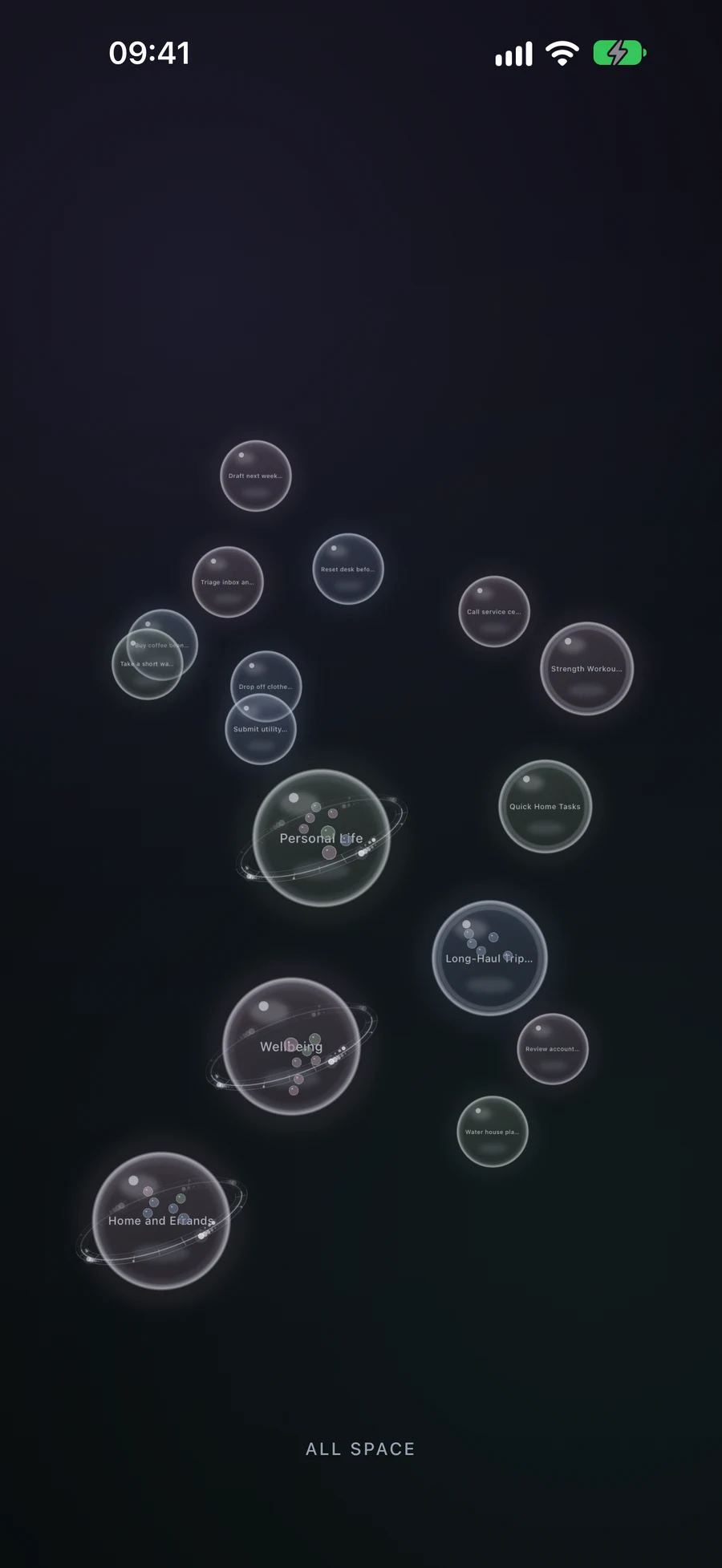
Big View follows the hierarchy and Active Space. Creating, moving or merging items changes the real organization. New provisional items need Save; Cancel rolls those drafts back. Color follows icon tone, not completion status.
Use the controls that suit you
Touch gestures, assistive actions and Reduced Motion support offer different ways to navigate. Apple TV uses Big View as its primary interface with remote controls; that does not mean every mobile editor is available on TV.
How it works in Mement
Explore and reorganize plans in Big View
Read the hierarchy before changing it
Areas are the largest spheres, Projects and Lists show Task progress, and Tasks are the smallest records you can open. A container previews some of its children; opening it reveals its contents, including records matched through Smart filters. The bottom label identifies your current level.
Try opening Home, then the reading-corner Project, then “Choose a lamp”. Close the Task details and use pinch-in from the fully zoomed-out view to rise through the levels. Sphere tone follows the record’s icon color family; use its name and contents to understand the work rather than reading the tone as a GTD status.
Big View uses the same records as the ordinary screens. The Active Space can narrow the visible structure, and changing that context returns the view to its root. For a crowded level, zoom closer to read names and pan by dragging empty space.
Create a Task or List on a touch screen
Hold an empty part of the view. A sphere grows under your finger: the first stage creates a Task and a longer hold reaches a List. Release at the kind you want, then fill in the editor and Save. The current container limits what can be created inside it; a List can contain Tasks, for example.
Cancel the new record’s editor to return to the previous structure. Creating a Project or Area through touch reorganization uses combination: two Lists form a Project, and two Projects form an Area. Accessible creation actions provide the kinds supported at the current level as well.
Combine related work or move it inside a container
Suppose “Choose a lamp” and “Order a shelf” are separate Task spheres. Long-press one until it lifts, then drag it onto the other. Combining two Tasks creates a List. Give the new List a useful name in its editor and Save to confirm. Cancelling restores the two original spheres.
Two Lists combine into a Project; two Projects into an Area. Two Areas do not combine. With different types, Mement can offer a new container or moving the smaller kind inside the larger. Moving a Task into an existing Project changes its placement without creating a new container or opening a naming editor.
If the combined result cannot remain inside the current container, Mement asks before raising it one level. For example, two Tasks inside a List would produce another List, which must sit outside that List. Read the proposed location before confirming; cancel when it does not express your structure.
Use the controls for your device
On Apple TV, Big View is the primary interface. Select opens a sphere, Back or Menu returns one level, and a long Select opens actions such as Create, Edit, or Combine. Follow those remote actions instead of applying the phone’s pinch gestures.
VoiceOver and other supported assistive technologies provide opening, creation, combination, and exit actions without spatial dragging. Reduced Motion removes nonessential movement. On the main app platforms, ordinary editors also remain available for choosing parents and arranging your plans.
A plan to adapt
Fictional example. Copying or downloading this text does not create records in Mement.